mirror of
https://github.com/chenasraf/massarg.git
synced 2026-05-17 17:38:09 +00:00

203 lines
6.4 KiB
Markdown
203 lines
6.4 KiB
Markdown
# massarg
|
|
|
|
<h2 align="center">
|
|
|
|
[GitHub](https://github.com/chenasraf/massarg) |
|
|
[Documentation](https://chenasraf.github.io/massarg) | [NPM](https://npmjs.com/package/massarg) |
|
|
[casraf.dev](https://casraf.dev)
|
|
|
|

|
|

|
|
|
|
</h2>
|
|
|
|
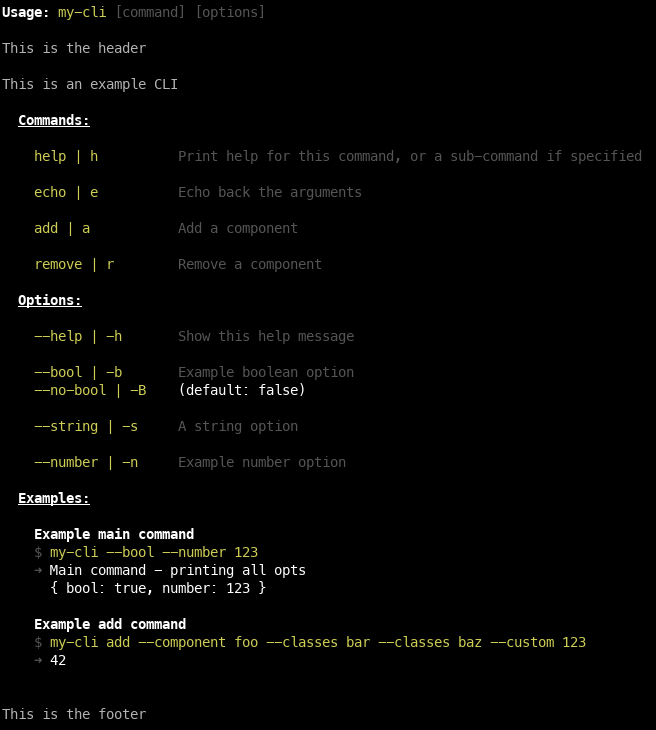
Massarg is a modern, flexible, powerful, and simple-to-use command/argument parser for JS
|
|
applications, allowing you to create complex but easy applications that consume command-line
|
|
arguments and commands.
|
|
|
|
It allows you to both parse argument options and flags, as well as hierarchal subcommands, both of
|
|
which can be parsed into an **automatic help command or flag** that displays all the information
|
|
easily, with customizable styles, and content.
|
|
|
|
You should only focus on actually writing the functionality of your CLI, and not waste it on writing
|
|
a way to parse the chain of commands, flags or options.
|
|
|
|
And it should look good too, right?
|
|
|
|
|
|
|
|
## Features
|
|
|
|
- Primary command to be run without args
|
|
- Commands to be run from arg
|
|
- Options with flexible parsing
|
|
- Required options
|
|
- Options with multiple values
|
|
- Nameless options
|
|
- Built-in error handling with customizable handlers
|
|
- Automatically generated help text:
|
|
- Customizable colors
|
|
- Customizable header and footer text
|
|
- Customizable usage examples
|
|
- Automatic text alignment
|
|
- Add run examples for your args
|
|
- Shows default value and type next to description
|
|
- TypeScript-first package: You will always have strong types
|
|
|
|
## Usage
|
|
|
|
## Quick Start
|
|
|
|
### Install
|
|
|
|
```shell
|
|
# pnpm
|
|
pnpm install massarg
|
|
# npm
|
|
npm install massarg
|
|
# yarn
|
|
yarn add massarg
|
|
```
|
|
|
|
### Import
|
|
|
|
```ts
|
|
import massarg from 'massarg'
|
|
```
|
|
|
|
### Usage
|
|
|
|
Call the default export function `massarg`, or create a new instance manually using `new Massarg()`,
|
|
and then you can start chaining commands. Use `.parse()` to do the final parsing and run the
|
|
commands and options.
|
|
|
|
Each function and option is documented. See
|
|
[the full documentation](https://chenasraf.github.io/massarg) for details.
|
|
|
|
JSDoc comments are also provided.
|
|
|
|
Here is an example with some commonly used examples to get you started.
|
|
|
|
```ts
|
|
const parser = massarg({
|
|
name: 'my-cli',
|
|
description: "Does really amazing stuff, you wouldn't believe!",
|
|
}) // or: new Massarg()
|
|
// The main command - runs when no commands are specified. If not provided, an error is thrown for
|
|
// required arguments.
|
|
.main((options) => console.log('main command', options))
|
|
// A subcommand example
|
|
.command({
|
|
name: 'foo',
|
|
description: 'a foo command',
|
|
aliases: ['f'],
|
|
// default prefixes:
|
|
optionPrefix: '--',
|
|
aliasPrefix: '-',
|
|
// The function to run for this command
|
|
run: (options) => console.log('foo command', options),
|
|
})
|
|
// A subcommand example, which contains its own set of options or sub commands. This is infinitely
|
|
// nestible.
|
|
.command(
|
|
massarg({
|
|
name: 'bar',
|
|
description: 'a bar command',
|
|
aliases: ['s'],
|
|
run: (options) => console.log('bar command', options),
|
|
}).option({
|
|
name: 'file',
|
|
description: 'Filename to use',
|
|
aliases: ['f'],
|
|
parse: (filename) => path.resolve(process.cwd(), filename),
|
|
}),
|
|
)
|
|
// A CLI option - argument with a value
|
|
.option({
|
|
name: 'my-string',
|
|
description: 'A string argument',
|
|
aliases: ['s'],
|
|
})
|
|
// A CLI flg - boolean argument with no value
|
|
.flag({
|
|
name: 'flag',
|
|
description: 'a flag that will be related to any command (main or sub)',
|
|
aliases: ['f'],
|
|
negatble: true,
|
|
negateName: 'no-flag', // Override the default negation name
|
|
negateAliases: ['F'], // Override the default negation aliases
|
|
})
|
|
// Usage examples for your CLI. Use this to describe various common usages or quirks.
|
|
.example({
|
|
description: 'Run the sub command',
|
|
input: 'my-bin --flag sub',
|
|
output: 'Sub command: flag is true',
|
|
})
|
|
// Configuration of the automated help section
|
|
.help({
|
|
bindCommand: true,
|
|
footerText: `Copyright © ${new Date().getFullYear()} Me, Myself and I`,
|
|
titleStyle: {
|
|
bold: true,
|
|
color: 'brightWhite',
|
|
},
|
|
})
|
|
```
|
|
|
|
### Error Handling
|
|
|
|
By default, massarg catches all errors and displays a friendly error message in red to stderr,
|
|
then exits with code 1. You can customize this behavior with the `.onError()` method:
|
|
|
|
```ts
|
|
massarg({
|
|
name: 'my-cli',
|
|
description: 'My CLI application',
|
|
})
|
|
.option({
|
|
name: 'config',
|
|
description: 'Config file path',
|
|
aliases: ['c'],
|
|
required: true,
|
|
})
|
|
// Custom error handler
|
|
.onError((error) => {
|
|
console.error(`Error: ${error.message}`)
|
|
// Log to external service, show custom UI, etc.
|
|
})
|
|
.parse()
|
|
```
|
|
|
|
**Error handling features:**
|
|
|
|
- **Default handler**: Logs error message in red to stderr
|
|
- **Custom handler**: Use `.onError(callback)` to override the default behavior
|
|
- **Automatic exit**: Process exits with code 1 after any error (regardless of handler)
|
|
- **Process-level handling**: Handlers also catch `uncaughtException` and `unhandledRejection`
|
|
- **Handler inheritance**: Error handlers propagate from parent commands to subcommands
|
|
|
|
## Documentation
|
|
|
|
The full documentation can be found here:
|
|
[Massarg Documentation](https://chenasraf.github.io/massarg)
|
|
|
|
- [Massarg](https://chenasraf.github.io/massarg/docs/api/classes/massarg.Massarg)
|
|
- [MassargOption](https://chenasraf.github.io/massarg/docs/api/classes/option.MassargOption)
|
|
- [MassargFlag](https://chenasraf.github.io/massarg/docs/api/classes/option.MassargFlag)
|
|
- [MassargExample](https://chenasraf.github.io/massarg/docs/api/classes/example.MassargExample)
|
|
|
|
## Contributing
|
|
|
|
I am developing this package on my free time, so any support, whether code, issues, or just stars is
|
|
very helpful to sustaining its life. If you are feeling incredibly generous and would like to donate
|
|
just a small amount to help sustain this project, I would be very very thankful!
|
|
|
|
<a href="https://ko-fi.com/casraf" target="_blank">
|
|
<img height="36"
|
|
src="https://cdn.ko-fi.com/cdn/kofi1.png?v=3"
|
|
alt="Buy Me a Coffee at ko-fi.com" />
|
|
</a>
|
|
|
|
I welcome any issues or pull requests on GitHub. If you find a bug, or would like a new feature,
|
|
don't hesitate to open an appropriate issue and I will do my best to reply promptly.
|