mirror of
https://github.com/chenasraf/simple-scaffold.git
synced 2026-05-18 01:29:09 +00:00

355 lines
12 KiB
Markdown
355 lines
12 KiB
Markdown
<p align="center">
|
|
<img src="https://chenasraf.github.io//simple-scaffold/img/logo-lg.png" alt="Logo" />
|
|
</p>
|
|
|
|
<h2 align="center">
|
|
|
|
[GitHub](https://github.com/chenasraf/simple-scaffold) |
|
|
[Documentation](https://chenasraf.github.io/simple-scaffold) |
|
|
[NPM](https://npmjs.com/package/simple-scaffold) | [casraf.dev](https://casraf.dev)
|
|
|
|

|
|

|
|
|
|
</h2>
|
|
|
|
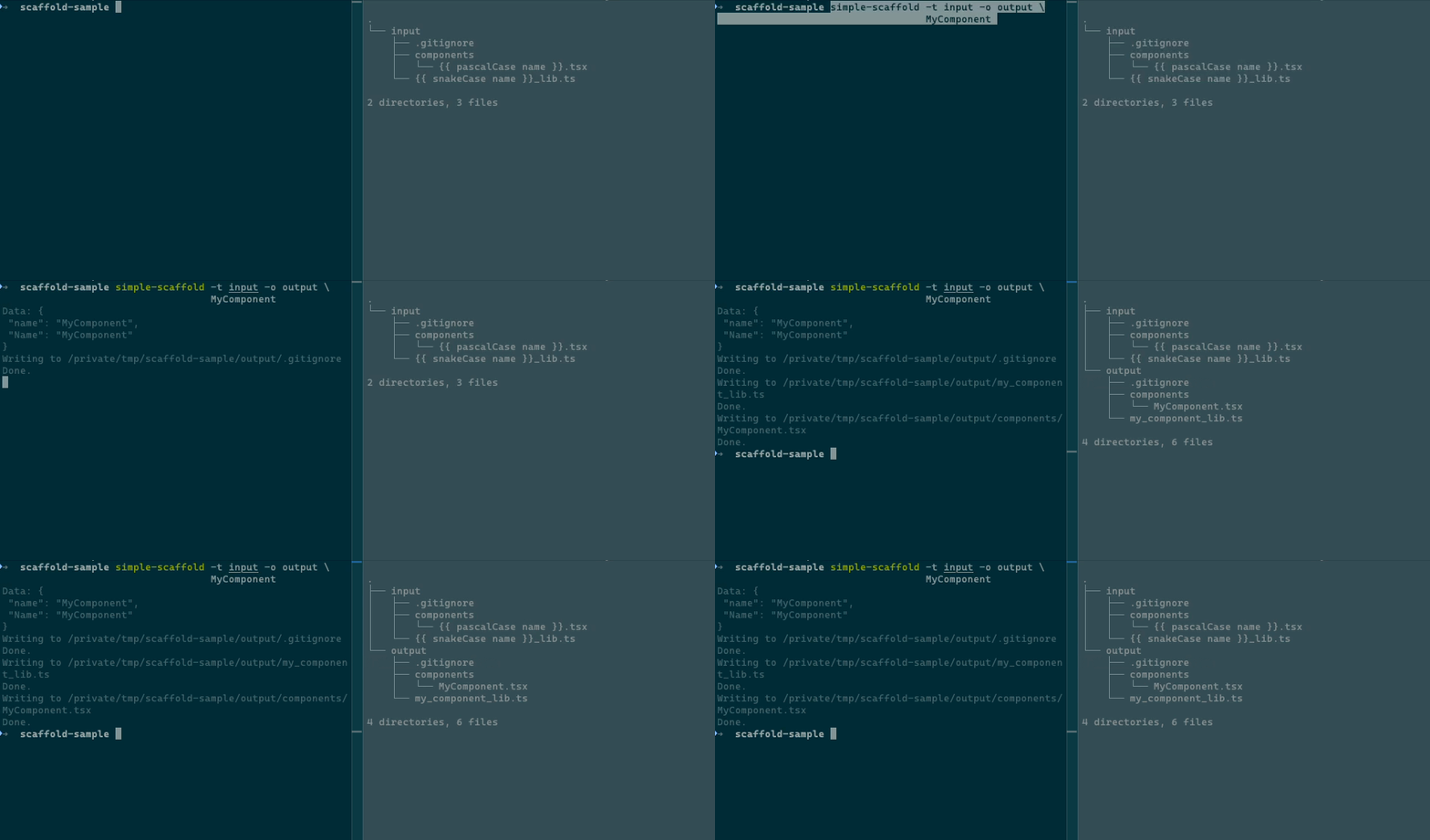
Simple Scaffold is a file scaffolding tool. You define templates once, then generate files from them
|
|
whenever you need — whether it's a single component or an entire app boilerplate.
|
|
|
|
Templates use **Handlebars.js** syntax, so you can inject data, loop over lists, use conditionals,
|
|
and write custom helpers. It works as a CLI or as a Node.js library, and it doesn't care what kind
|
|
of files you're generating.
|
|
|
|
<div align="center">
|
|
|
|
|
|
|
|
</div>
|
|
|
|
---
|
|
|
|
> **Full documentation is available at
|
|
> [chenasraf.github.io/simple-scaffold](https://chenasraf.github.io/simple-scaffold)** — including
|
|
> detailed guides on [CLI usage](https://chenasraf.github.io/simple-scaffold/docs/usage/cli),
|
|
> [Node.js API](https://chenasraf.github.io/simple-scaffold/docs/usage/node),
|
|
> [templates](https://chenasraf.github.io/simple-scaffold/docs/usage/templates),
|
|
> [configuration files](https://chenasraf.github.io/simple-scaffold/docs/usage/configuration_files),
|
|
> [examples](https://chenasraf.github.io/simple-scaffold/docs/usage/examples), and
|
|
> [migration from v1/v2](https://chenasraf.github.io/simple-scaffold/docs/usage/migration).
|
|
|
|
## Table of Contents
|
|
|
|
- [Getting Started](#getting-started)
|
|
- [Configuration Files](#configuration-files)
|
|
- [Templates](#templates)
|
|
- [Interactive Mode & Inputs](#interactive-mode--inputs)
|
|
- [Remote Templates](#remote-templates)
|
|
- [CLI Reference](#cli-reference)
|
|
- [Node.js API](#nodejs-api)
|
|
- [Built-in Helpers](#built-in-helpers)
|
|
- [Contributing](#contributing)
|
|
|
|
## Getting Started
|
|
|
|
### Install
|
|
|
|
```sh
|
|
npm install -D simple-scaffold
|
|
# or use directly with npx
|
|
npx simple-scaffold
|
|
```
|
|
|
|
### Initialize a Project
|
|
|
|
Run `init` to create a config file and an example template:
|
|
|
|
```sh
|
|
npx simple-scaffold init
|
|
```
|
|
|
|
This creates `scaffold.config.js` and `templates/default/{{name}}.md`. Now generate files:
|
|
|
|
```sh
|
|
npx simple-scaffold MyProject
|
|
```
|
|
|
|
### One-off Usage (No Config)
|
|
|
|
Generate files from a template directory without a config file:
|
|
|
|
```sh
|
|
npx simple-scaffold -t templates/component -o src/components MyComponent
|
|
```
|
|
|
|
## Configuration Files
|
|
|
|
Config files let you define reusable scaffold definitions. Simple Scaffold **auto-detects** config
|
|
files in the current directory — no `--config` flag needed.
|
|
|
|
It searches for these files in order:
|
|
|
|
`scaffold.config.{mjs,cjs,js,json}`, `scaffold.{mjs,cjs,js,json}`, `.scaffold.{mjs,cjs,js,json}`
|
|
|
|
### Example
|
|
|
|
```js
|
|
// scaffold.config.js
|
|
module.exports = {
|
|
component: {
|
|
templates: ["templates/component"],
|
|
output: "src/components",
|
|
},
|
|
page: {
|
|
templates: ["templates/page"],
|
|
output: "src/pages",
|
|
subdir: true,
|
|
},
|
|
}
|
|
```
|
|
|
|
Then run:
|
|
|
|
```sh
|
|
npx simple-scaffold -k component MyComponent
|
|
npx simple-scaffold -k page Dashboard
|
|
```
|
|
|
|
Use the key `default` to skip the `-k` flag entirely.
|
|
|
|
### Listing Available Templates
|
|
|
|
```sh
|
|
npx simple-scaffold list
|
|
npx simple-scaffold list -c path/to/config.js
|
|
```
|
|
|
|
## Templates
|
|
|
|
Templates are regular files in a directory. Both **file names** and **file contents** support
|
|
Handlebars syntax. Simple Scaffold preserves the directory structure of your template folder.
|
|
|
|
### Example Template
|
|
|
|
`templates/component/{{pascalCase name}}.tsx`
|
|
|
|
```tsx
|
|
// Created: {{ now 'yyyy-MM-dd' }}
|
|
import React from "react"
|
|
|
|
export default {{ pascalCase name }}: React.FC = (props) => {
|
|
return (
|
|
<div className="{{ camelCase name }}">{{ pascalCase name }} Component</div>
|
|
)
|
|
}
|
|
```
|
|
|
|
Running `npx simple-scaffold -t templates/component -o src/components PageWrapper` produces
|
|
`src/components/PageWrapper.tsx` with all tokens replaced.
|
|
|
|
### Glob Patterns & Exclusions
|
|
|
|
Template paths support globs and negation:
|
|
|
|
```js
|
|
{
|
|
templates: ["templates/component/**", "!templates/component/README.md"]
|
|
}
|
|
```
|
|
|
|
### .scaffoldignore
|
|
|
|
Place a `.scaffoldignore` file in your template directory to exclude files. It works like
|
|
`.gitignore` — one pattern per line, `#` for comments.
|
|
|
|
## Interactive Mode & Inputs
|
|
|
|
When running in a terminal, Simple Scaffold prompts for any missing required values (name, output,
|
|
template key). Config files can also define **inputs** — custom fields that are prompted
|
|
interactively:
|
|
|
|
```js
|
|
module.exports = {
|
|
component: {
|
|
templates: ["templates/component"],
|
|
output: "src/components",
|
|
inputs: {
|
|
author: { type: "text", message: "Author name", required: true },
|
|
license: { type: "select", message: "License", options: ["MIT", "Apache-2.0", "GPL-3.0"] },
|
|
isPublic: { type: "confirm", message: "Public package?" },
|
|
priority: { type: "number", message: "Priority level", default: 1 },
|
|
},
|
|
},
|
|
}
|
|
```
|
|
|
|
**Input types:** `text` (default), `select`, `confirm`, `number`
|
|
|
|
Pre-fill inputs from the command line to skip prompts:
|
|
|
|
```sh
|
|
npx simple-scaffold -k component -D author=John -D license=MIT MyComponent
|
|
```
|
|
|
|
## Remote Templates
|
|
|
|
Use templates from any Git repository:
|
|
|
|
```sh
|
|
# GitHub shorthand
|
|
npx simple-scaffold -g username/repo -k component MyComponent
|
|
|
|
# Full Git URL (GitLab, Bitbucket, etc.)
|
|
npx simple-scaffold -g https://gitlab.com/user/repo.git -k component MyComponent
|
|
```
|
|
|
|
The repository is cloned to a temporary directory, used, and cleaned up automatically.
|
|
|
|
## CLI Reference
|
|
|
|
### Commands
|
|
|
|
| Command | Description |
|
|
| ------------- | ---------------------------------------- |
|
|
| `[name]` | Generate files from a template (default) |
|
|
| `init` | Create config file and example template |
|
|
| `list` / `ls` | List available template keys in a config |
|
|
|
|
### Options
|
|
|
|
| Flag | Short | Description | Default |
|
|
| ------------------------------ | --------- | ---------------------------------------------------- | ----------- |
|
|
| `--config` | `-c` | Path to config file or directory | auto-detect |
|
|
| `--git` | `-g` | Git URL or GitHub shorthand | |
|
|
| `--key` | `-k` | Template key from config | `default` |
|
|
| `--output` | `-o` | Output directory | |
|
|
| `--templates` | `-t` | Template file paths or globs | |
|
|
| `--data` | `-d` | Custom JSON data | |
|
|
| `--append-data` | `-D` | Key-value data (`key=string`, `key:=raw`) | |
|
|
| `--subdir`/`--no-subdir` | `-s`/`-S` | Create parent directory with input name | `false` |
|
|
| `--subdir-helper` | `-H` | Helper to transform subdir name | |
|
|
| `--overwrite`/`--no-overwrite` | `-w`/`-W` | Overwrite existing files | `false` |
|
|
| `--dry-run` | `-dr` | Preview output without writing files | `false` |
|
|
| `--before-write` | `-B` | Script to run before each file is written | |
|
|
| `--after-scaffold` | `-A` | Shell command to run after scaffolding | |
|
|
| `--quiet` | `-q` | Suppress output | |
|
|
| `--log-level` | `-l` | Log level (`none`, `debug`, `info`, `warn`, `error`) | `info` |
|
|
| `--version` | `-v` | Show version | |
|
|
| `--help` | `-h` | Show help | |
|
|
|
|
## Node.js API
|
|
|
|
```js
|
|
import Scaffold from "simple-scaffold"
|
|
|
|
// Basic usage
|
|
const scaffold = new Scaffold({
|
|
name: "MyComponent",
|
|
templates: ["templates/component"],
|
|
output: "src/components",
|
|
})
|
|
await scaffold.run()
|
|
|
|
// Load from config file
|
|
const scaffold = await Scaffold.fromConfig("scaffold.config.js", {
|
|
key: "component",
|
|
name: "MyComponent",
|
|
})
|
|
await scaffold.run()
|
|
```
|
|
|
|
### Config Options
|
|
|
|
| Option | Type | Description |
|
|
| --------------- | -------------------------- | ------------------------------------- |
|
|
| `name` | `string` | Name for generated files (required) |
|
|
| `templates` | `string[]` | Template paths or globs (required) |
|
|
| `output` | `string \| Function` | Output directory or per-file function |
|
|
| `data` | `Record<string, unknown>` | Custom template data |
|
|
| `inputs` | `Record<string, Input>` | Interactive input definitions |
|
|
| `helpers` | `Record<string, Function>` | Custom Handlebars helpers |
|
|
| `subdir` | `boolean` | Create parent directory with name |
|
|
| `subdirHelper` | `string` | Helper for subdir name transformation |
|
|
| `overwrite` | `boolean \| Function` | Overwrite existing files |
|
|
| `dryRun` | `boolean` | Preview without writing |
|
|
| `logLevel` | `string` | Log verbosity |
|
|
| `beforeWrite` | `Function` | Async hook before each file write |
|
|
| `afterScaffold` | `Function \| string` | Hook after all files are written |
|
|
|
|
## Built-in Helpers
|
|
|
|
All helpers work in both file names and file contents.
|
|
|
|
### Case Helpers
|
|
|
|
| Helper | Example Input | Output |
|
|
| ------------ | ------------- | --------- |
|
|
| `camelCase` | `my name` | `myName` |
|
|
| `pascalCase` | `my name` | `MyName` |
|
|
| `snakeCase` | `my name` | `my_name` |
|
|
| `kebabCase` | `my name` | `my-name` |
|
|
| `hyphenCase` | `my name` | `my-name` |
|
|
| `startCase` | `my name` | `My Name` |
|
|
| `upperCase` | `my name` | `MY NAME` |
|
|
| `lowerCase` | `My Name` | `my name` |
|
|
|
|
### Date Helpers
|
|
|
|
```handlebars
|
|
{{now "yyyy-MM-dd"}}
|
|
{{now "yyyy-MM-dd HH:mm" -1 "hours"}}
|
|
{{date myDateVar "yyyy-MM-dd"}}
|
|
{{date "2077-01-01T00:00:00Z" "yyyy-MM-dd" 7 "days"}}
|
|
```
|
|
|
|
### Custom Helpers
|
|
|
|
Add your own via config:
|
|
|
|
```js
|
|
module.exports = {
|
|
component: {
|
|
templates: ["templates/component"],
|
|
output: "src/components",
|
|
helpers: {
|
|
shout: (str) => str.toUpperCase() + "!!!",
|
|
},
|
|
},
|
|
}
|
|
```
|
|
|
|
## Contributing
|
|
|
|
I am developing this package on my free time, so any support, whether code, issues, or just stars is
|
|
very helpful to sustaining its life. If you are feeling incredibly generous and would like to donate
|
|
just a small amount to help sustain this project, I would be very very thankful!
|
|
|
|
<a href='https://ko-fi.com/casraf' target='_blank'>
|
|
<img
|
|
height='36'
|
|
src='https://cdn.ko-fi.com/cdn/kofi1.png?v=3'
|
|
alt='Buy Me a Coffee at ko-fi.com'
|
|
/>
|
|
</a>
|
|
|
|
I welcome any issues or pull requests on GitHub. If you find a bug, or would like a new feature,
|
|
don't hesitate to open an appropriate issue and I will do my best to reply promptly.
|
|
|
|
If you are a developer and want to contribute code, here are some starting tips:
|
|
|
|
1. Fork this repository
|
|
2. Run `pnpm install`
|
|
3. Run `pnpm dev` to start file watch mode
|
|
4. Make any changes you would like
|
|
5. Create tests for your changes
|
|
6. Update the relevant documentation (readme, code comments, type comments)
|
|
7. Create a PR on upstream
|
|
|
|
Some tips on getting around the code:
|
|
|
|
- Use `pnpm cmd` to use the CLI feature of Simple Scaffold from within the root directory, enabling
|
|
you to test different behaviors. See `pnpm cmd -h` for more information.
|
|
- Use `pnpm test` to run tests
|
|
- Use `pnpm docs:build` to build the documentation once
|
|
- Use `pnpm docs:watch` to start docs in watch mode
|
|
- Use `pnpm build` to build the output
|